Skip to content

Tooling

Development processes in the GenAI era
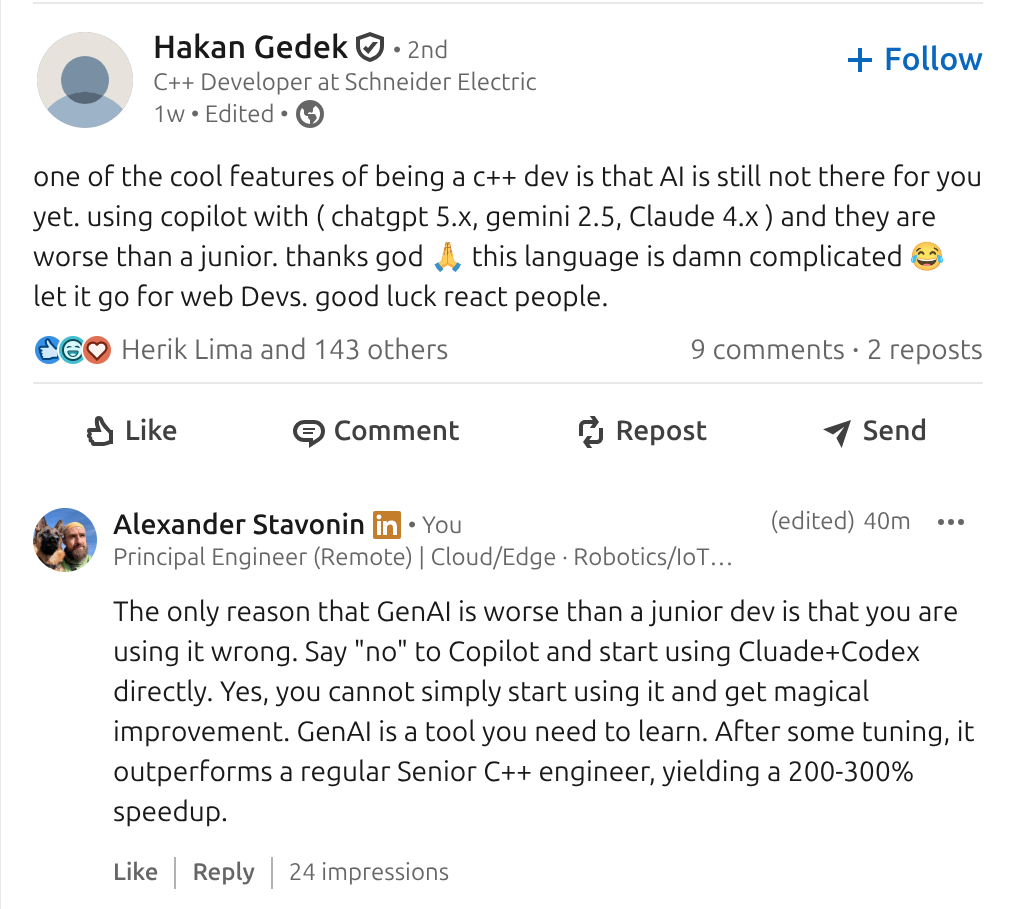
The current debate around GenAI and C++ is a good illustration of the real problem. Many engineers report that models are worse than juniors. Others report dramatic speedups on the same language and problem space. Both observations are correct.

The difference is not the model. It is the absence or presence of the state.

Most GenAI usage today is stateless. A model is dropped into an editor with a partial view of the codebase, no durable memory, no record of prior decisions, no history of failed attempts, and no awareness of long-running context. In that mode, the model behaves exactly like an amnesic junior engineer. It repeats mistakes, ignores constraints, and proposes changes without understanding downstream consequences.

When engineers conclude that “AI is not there yet for C++”, they are often reacting to this stateless setup.

At the same time, GenAI does not elevate engineering skill. It does not turn a junior into a senior. What it does is amplify the level at which an engineer already operates. A senior engineer using GenAI effectively becomes a faster senior, and a junior becomes a faster junior. Judgment is not transferred, and the gap does not close automatically.

These two facts are tightly coupled. In stateless, unstructured usage, GenAI amplifies noise. In a stateful, constrained workflow with explicit ownership and review, it amplifies competence.

This is why reported productivity gains vary so widely. Claims of 200–300% speedup are achievable, but only locally and only within the bounds of the user’s existing competence. Drafting, exploration, task decomposition, and mechanical transformation accelerate sharply. End-to-end throughput increases are lower because planning, integration, validation, and responsibility remain human-bound.

The question, then, is not whether GenAI is “good enough”. The question is what kind of system you embed it into.

Note

Everything I'll explain below is only applicable to the Stateful GenAI setup.

Today I learned... git shallow

Sometimes you need to understand why something exists, and instead, you’re staring at a mystery. It feels like magic for a moment. But there is no magic in IT. There is always a reason, and usually it’s painfully concrete.

Today I learned that if git blame suddenly claims I wrote the entire million-line project, it might be lying 🙂

I ran into a situation where my local git blame attributed every line to a single recent commit, while GitLab showed the correct historical authors. At first glance, it looked like history had been rewritten, which is odd and incorrect.

Dealing with ThreadSanitizer Fails on Startup

Usually, you need just a few lines to initialize TSan in your project: you compile with the sanitizer flags, run the tests, and get a clear report of which threads touched which memory locations. On a modern Linux system, that simple expectation can fail in a very non-obvious way.

FATAL: ThreadSanitizer: unexpected memory mapping 0x...

In my case, I attached TSan to a not-so-young C++ codebase and immediately encountered a fatal runtime error from the sanitizer, long before any of the project's code executed. No race report, no helpful stack trace, just a hard abort complaining about an "unexpected memory mapping."

If you can upgrade your toolchain to LLVM 18.1 or newer, this problem effectively disappears, because newer TSan builds know how to recover from the incompatible memory layout. Suppose you are pinned to an older LLVM (by CI images, production constraints, or corporate distro policy). In that case, you are in the same situation I was: you have to understand what the sanitizer is trying to do with the address space, and work around the failure mode yourself.

Cross-Compiling Rust for Raspberry Pi

I just started a new embedded pet project on the Raspberry Pi, and I expect it'll be a pretty big one, so I've been thinking about the technology from the beginning. The overall goal is to create a glass-to-glass video pipeline example. Let's see how it's going. For now, I'm using a USB V4L2 camera while waiting for the native Pi modules to arrive, but it's enough to sketch the capture loop and start testing the build pipeline. The application itself is minimal—open /dev/video0, request YUYV at 1280x720, set up MMAP buffers, and iterate over frames—but the real challenge occurs when v4l triggers bindgen, and the build must cross-compile cleanly for aarch64

The language choice immediately becomes part of the equation right away. Go is my favorite and, usually, is not considered as an option by many embedded developers. But it's a good choice for small embedded utilities because its cross-compilation story is nearly effortless. Need an ARM binary? One command and you have it!

GOOS=linux GOARCH=arm64 go build

Multilingual benchmarking project => Bazel for advanced engineering

caption

In her one year, Molly saw many more exciting places than I did until I was about 28. She does pretty well :-D

When working on performance experiments across C++ and Go, you obviously need a multilingual project structure. There were two paths forward: create separate build systems under a shared repository, or consolidate everything under a single, coherent framework. Bazel made that decision easy.

Using Bazel to unify builds isn’t just convenient—it should be the default choice for any serious engineering effort that involves multiple languages. It eliminates the friction of managing isolated tools, brings deterministic builds, and handles dependencies, benchmarking, and cross-language coordination with minimal ceremony.

Here’s why Bazel makes sense for performance-critical, multilingual projects like this one—no fragile tooling, no redundant setups, just clean integration that scales.

How to compile C++ in 2025. Bazel or CMake?

caption

Today, we’re examining two modern build systems for C++: CMake, the industry favorite, and Bazel, a powerful alternative. While CMake is often the default choice, I believe that approach warrants a bit more scrutiny—after all, we’re focusing on modern tools here (yep, not counting Make, right?). To explore this, I’ve created a practical demo project showcasing how both systems manage a real-world scenario.

Using the maelstrom-challenges project as a starting point, I’ve extracted a C++ library called maelstrom-node. This library has been set up to work seamlessly with both Bazel and CMake, giving us a hands-on comparison of their approaches, strengths, and quirks.

The Project Structure

Here’s what the final directory layout for maelstrom-node looks like:

Managing Multi-Language Projects with Bazel

caption

In today’s software development landscape, it’s rare to encounter a project built with just one programming language or platform. Modern applications often require integrating multiple technologies to meet diverse requirements. This complexity is both a challenge and an opportunity, demanding robust tools to manage dependencies, builds, and integrations seamlessly. Bazel, a powerful build system, is one such tool that has proven invaluable for multi-language projects.

Recently, I decided to extend my Maelstrom challenges with a C++-based test to explore how Bazel can simplify managing multi-language dependencies and streamline development workflows.

Why Bazel for Multi-Language Projects?

Bazel’s design philosophy emphasizes performance and scalability, making it an excellent choice for projects that involve multiple languages. With its support for Bazel modules, adding dependencies is as simple as declaring them in a MODULE.bazel file. For example, integrating the popular logging library spdlog is straightforward:

Bazel and Rust: A Perfect Match for Scalable Development

caption

Bazel never fails to impress, and its support for Rust demonstrates its versatility and commitment to modern development. Two distinct dependency management modes—Cargo—based and pure Bazel—allow developers to tailor workflows to their projects' needs. This adaptability is particularly valuable for integrating Rust applications into monorepos or scaling complex systems. I decided to explore how Bazel supports Rust, including managing dependencies, migrating from Cargo.toml to BUILD.bazel, and streamlining integration testing.

Harnessing Cargo-Based Dependency Management

Bazel’s ability to integrate with Cargo, Rust’s native package manager, is a standout feature. This approach preserves compatibility with the Rust ecosystem while allowing projects to benefit from Bazel’s powerful build features. By using rules_rust, a Bazel module can seamlessly import dependencies defined in Cargo.toml and Cargo.lock into its build graph.

Returning to Rust: A Journey Through Tooling, Performance

When I started tackling the Maelstrom challenges, my initial thought was to use C++. It’s a language I know inside out, and its performance is hard to beat. However, as I contemplated setting up the project, I realized I couldn’t justify fighting with the C++ pipeline for free. Crafting a proper CMake or Bazel configuration might be worthwhile for large-scale projects or when compensated, but for personal experiments? It’s an unnecessary headache.

Why Go is My Default Choice

For most non-performance critical scenarios, Go is my default, no-brainer choice. It has a clean build system, excellent tooling, and a developer experience that doesn’t make me dread the setup process. Go’s simplicity allows me (and any level team) to focus on solving the problem rather than wrestling with the environment. Yet, this time, I decided to take a different path.

Minimal CI for Go library with GitHub actions

caption

Continuous Integration (CI) has become an essential part of modern software development, and for good reason. It ensures code quality, speeds up development, and catches potential issues early. However, you can get started without an elaborate CI setup. Even a minimal CI setup can significantly improve your workflow. Here's why every project should have at least minimal CI and how to implement it effectively using GitHub Actions.

What Constitutes Minimal CI?

For a project to benefit from CI without excessive complexity, it should include the following essential components:

  1. Project Compilation: Verify that the codebase is always in a buildable state.
  2. Unit Test Execution: Ensure the core functionality works as expected.
  3. Static Code Analysis: Catch bugs and enforce coding standards before they become an issue.